Use cases

Where sketches go
to get their second life.

SketchAlchemy turns any captured handwriting — a whiteboard photo, an iPad scribble, a reMarkable page, a scanned notebook — into a clean image and a fully editable Excalidraw or Obsidian scene: conversion is AI-driven, so results aren't always perfect, but everything that comes back is yours to correct (accuracy note). Below are the eight workflows people actually pay for, ordered by how much demand we see for each, with the exact pipeline for every one.

I.Highest demand

The whiteboard session that has to survive the meeting.

You just spent ninety minutes drawing the service boundaries, the queues and the failure paths. Then everyone photographs the board, the photo lands in a chat thread, and by Thursday nobody can read it. Redrawing it by hand in a diagram tool takes another hour you don't have — so it doesn't happen, and the decision quietly loses its record.

SketchAlchemy converts that photo into a clean, readable diagram and an editable Excalidraw scene in one pass. Boxes become real rectangles, labels become typed text in the same place and colour, and the connections you drew are read as connections rather than re-imagined into a generic template*. From there you rename a service, add the cache you forgot, and paste it straight into your design doc, the team wiki or the onboarding guide. The whiteboard becomes a living artefact instead of a photo in a thread.

Sanitize + ConvertBackend & platform teamsArchitectsTech leadsDesign docs & wikis

Whiteboard photo to diagram: photo tips and real examples →

Workflow
1Photograph the board on your way out — angle, glare and marker smudge are fine.
2Run Sanitize + Convert: deskew, de-noise, handwriting → typed text, then a real scene.
3Fix the two things you got wrong at the board, in Excalidraw.
4Export .excalidraw for the repo or .excalidraw.md for the docs vault.
Whiteboard photo → sanitized diagram → editable in Excalidraw
II.Very high demand

Handwritten thinking that lands native in your vault.

People who think on an iPad or a reMarkable end up with two knowledge bases: the typed one they can search and link, and the handwritten one they can't. Screenshots of pages are dead ends — un-searchable, un-editable, impossible to extend six months later when the idea finally matures.

SketchAlchemy exports an Obsidian-ready .excalidraw.md that drops straight into a vault as an editable, linkable atom. Your handwriting becomes typed text, so it is searchable; the diagram stays a diagram, so it is still the shape you thought in — and anything the model misread is editable in the note itself*. Scenes are re-baked for light and dark themes, which means the note looks correct in whichever theme your vault runs. Zettelkasten users get the part they always missed: visual notes that behave like every other note.

Sanitize + ConvertObsidianiPad & Apple PencilreMarkableZettelkasten

Step-by-step: handwritten notes into Obsidian Excalidraw →

Workflow
1Export the page as PNG/JPG from your tablet or scanner app.
2Convert, then pick your output theme — light or dark, re-baked to match your vault.
3Download .excalidraw.md and drop it into the vault folder.
4Link it, tag it, keep editing it inside Obsidian's Excalidraw plugin.
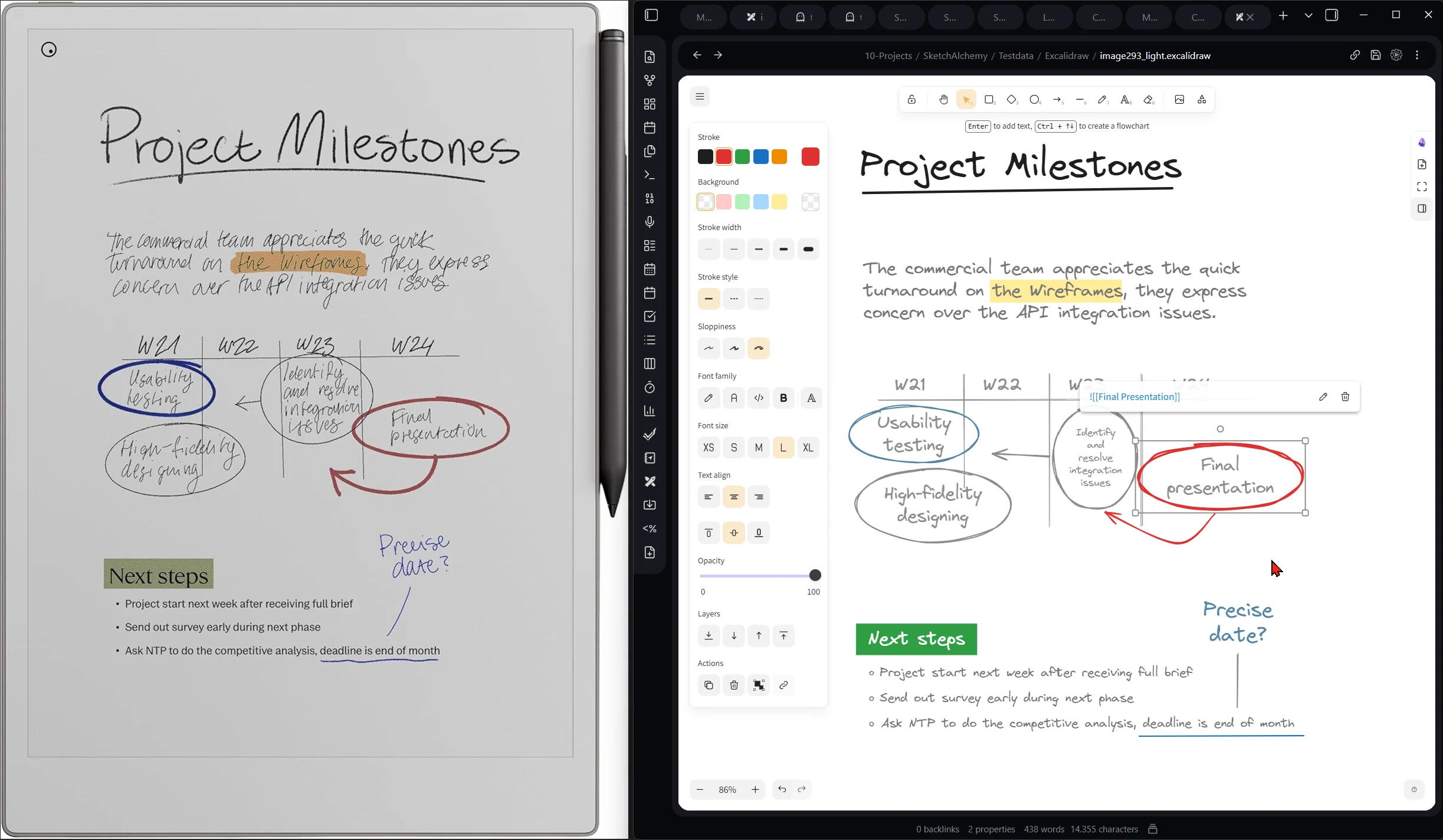
A handwritten 'Project Milestones' page on a reMarkable tablet next to the same diagram converted and open in an Obsidian note via the Excalidraw plugin, light theme
reMarkable page on the left, the same diagram live in an Obsidian note on the right.
III.High demand

Lecture notes you can actually study from.

Notes taken at lecture speed are fast, not legible: cramped arrows, three abbreviations for the same term, a diagram squeezed into the margin. Come revision week you are decoding your own handwriting instead of learning the material — and diagrams are exactly the part you most need to redraw from memory.

Run the page through SketchAlchemy and it comes back as a clean, readable diagram with your layout intact, plus an editable version you can extend as the course goes on. Add the term the lecturer said but you didn't catch. Fold in this week's slide. Because the export is a real scene, one diagram can grow across a whole semester instead of being re-drawn four times — and the clean PNG is what you paste into a shared study set for everyone else.

Sanitizeor Sanitize + ConvertUniversity studentsMed & engineeringStudy groups
Workflow
1Photograph the page after the lecture — one shot per diagram.
2Sanitize for a crisp 2K image you can read and share instantly.
3Convert the ones you'll keep building on all term.
4Annotate, extend and re-export before the exam.
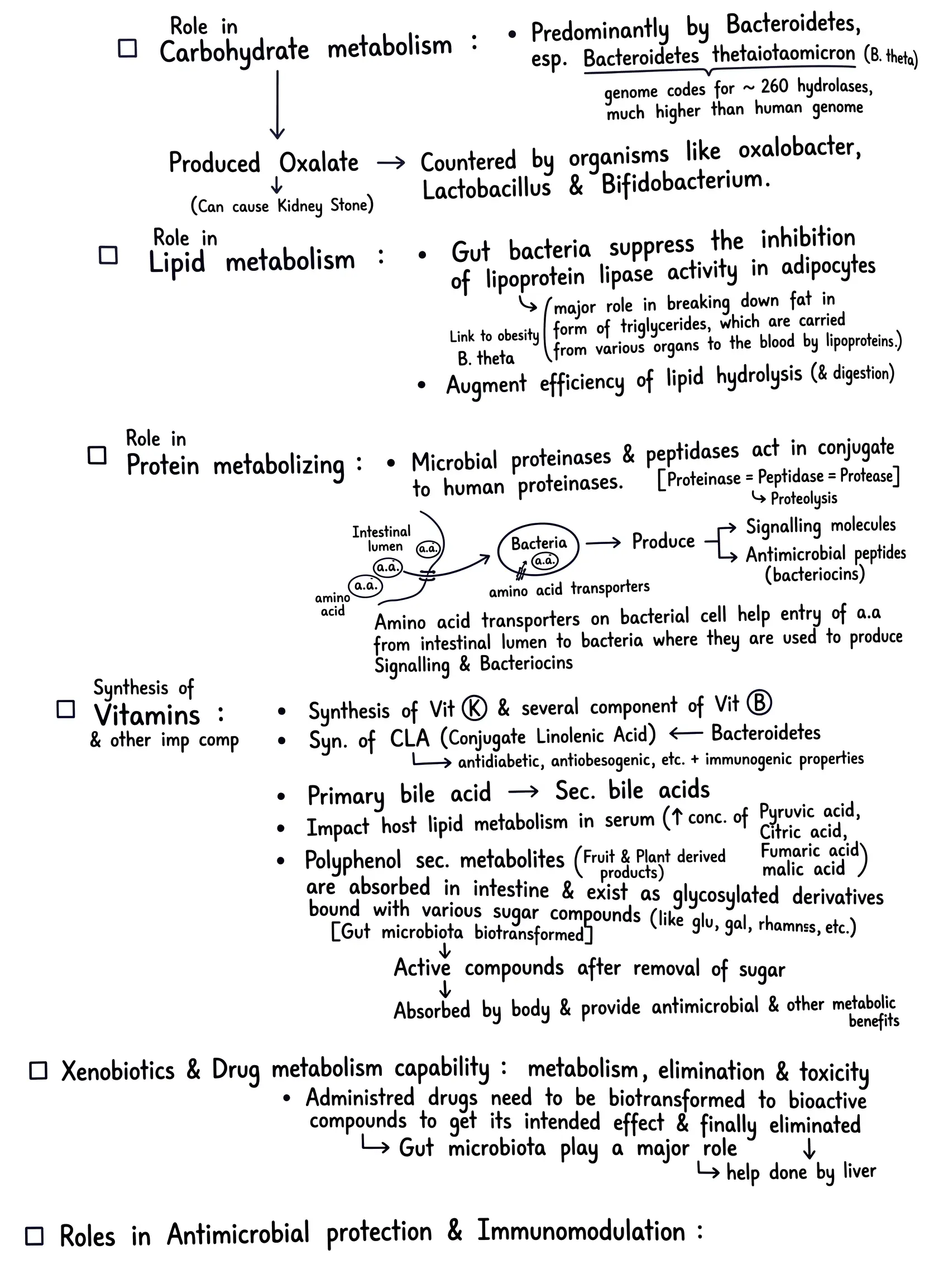
Original pageEnlarge ↗
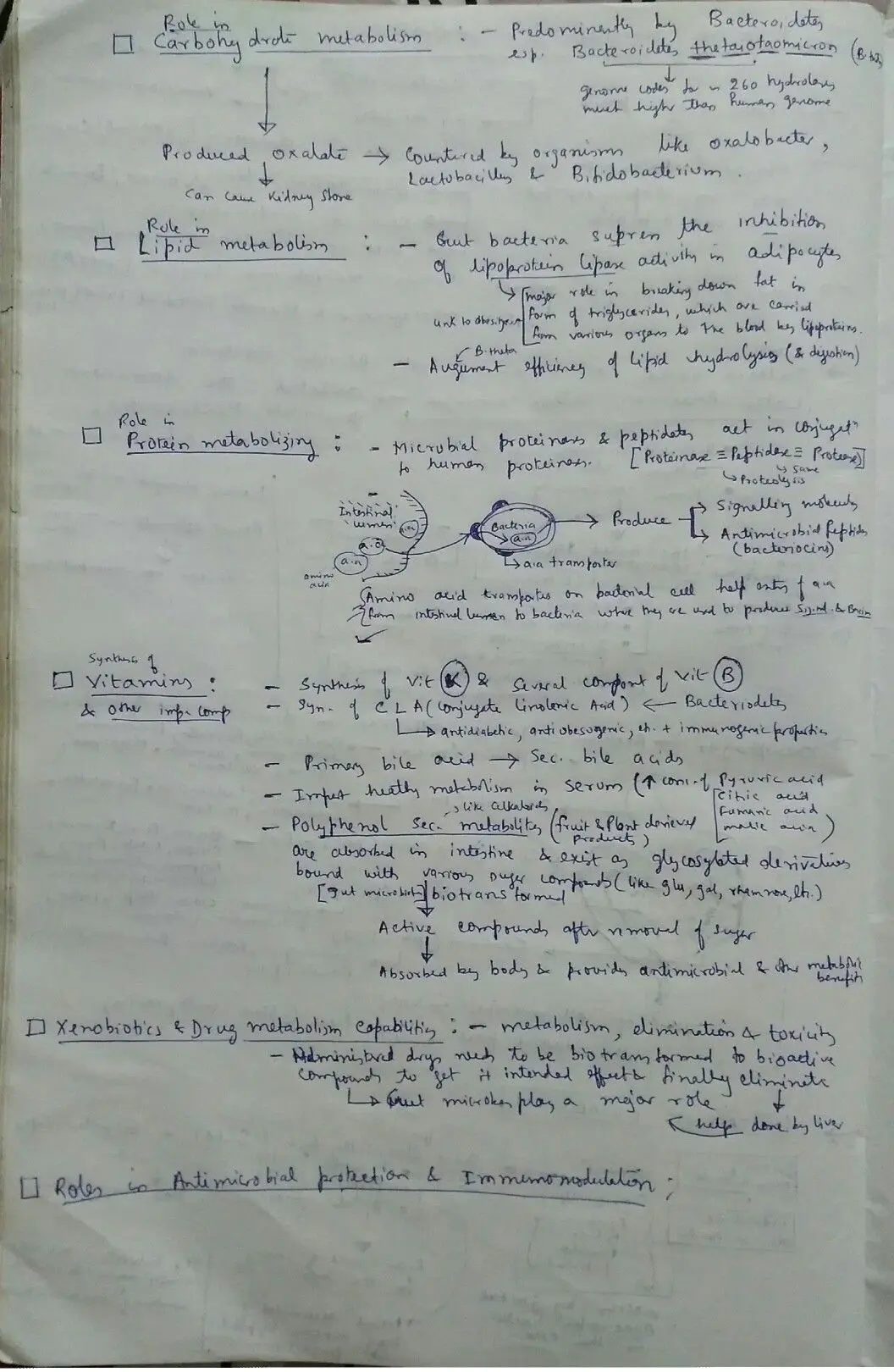
Handwritten lecture notes on gut microbiota metabolism, cramped ballpoint handwriting on lined paper
After sanitizingEnlarge ↗
The same lecture notes sanitized into clean, legible text with the original layout, arrows and diagram intact
Real revision notes — same layout, arrows and margin diagram, now readable.
IV.High demand · billable

Workshop output that looks billable by evening.

Consultants and facilitators live off what comes out of the room: the current-state map, the value-stream sketch, the org diagram argued over for two hours. Clients don't pay for a phone photo — so someone spends the evening rebuilding it in a diagram tool, and that hour is either written off or invisibly padded into the invoice.

SketchAlchemy collapses that hour into a minute. Sanitize each capture for a presentation-grade image, convert the ones that will keep evolving into editable scenes, and send the readout the same day the workshop ended — the strongest signal of competence a consultant has. Because layout and colour survive, the client recognises the diagram they helped draw, which is precisely why the readout lands.

Sanitize + ConvertConsultantsAgenciesCoaches & facilitatorsDiscovery workshops
Workflow
1Capture every board and flip-chart before the room is wiped.
2Batch through Sanitize for deck-ready images; you see the cost estimate before each job runs.
3Convert the living artefacts — roadmaps, current-state maps — to editable scenes.
4Drop into the readout deck and send it while the room is still warm.
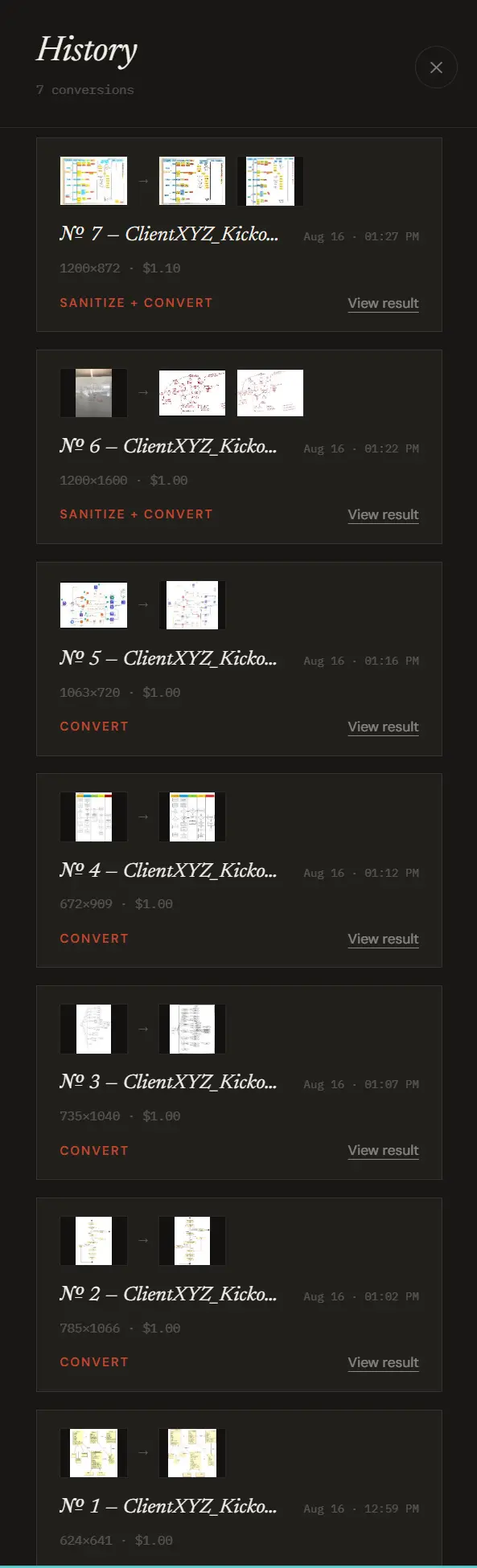
Conversion history panel listing seven ClientXYZ kickoff conversions with timestamps, dimensions and per-job cost
One kickoff, seven conversions, $7.10 — done the same afternoon.
V.Strong demand

Paper wireframes, promoted to editable flows.

Designers sketch on paper because it is faster than any tool and it keeps the idea cheap. The cost arrives at handoff: the flow has to exist somewhere the team can comment on, version and extend — so it gets rebuilt from scratch, and the rebuild quietly loses half of the reasoning that was scribbled in the margin.

Convert the sketch instead. You get real frames, real labels, real arrows in an Excalidraw scene — the same boxes in the same positions at the same sizes, ready to be rearranged rather than redrawn. Marginal doodles and tiny illustrations are carried over as embedded crops wherever they can be*, so the intent tends to survive the promotion from paper to file. Sketch six screens over coffee; have a commentable flow before standup.

ConvertProduct designersUX researchersFoundersDesign handoff
Workflow
1Sketch the screens on paper or tablet; shoot the whole sheet.
2Convert straight to an editable scene — skip sanitizing if the capture is already clean.
3Preview it, regenerate if it isn't right, then rearrange frames freely.
4Share the scene for comments, or embed it in the spec.
Paper wireframes converted, then boxes dragged and labels retyped — object-level editable
VI.Steady demand

Teaching material you draw once and reuse for years.

Every teacher and course creator has diagrams that only exist on a board: the one explanation that finally works, redrawn each term and photographed by students at the back of the room. Turning it into slide-quality material means rebuilding it in software, which is why most of it never leaves the board.

Sanitize the capture and you have a crisp 2K image for slides, handouts and course pages. Convert it and you have a scene you can restyle, translate, label progressively for a build-up sequence, or hand to students as an editable starting point. One good explanation becomes a reusable asset — and an accessible one, since typed text can be read out, zoomed and searched in a way handwriting on a board never can.

Sanitizethen ConvertTeachers & lecturersCourse creatorsTutors
Workflow
1Photograph the board explanation at the end of the class.
2Sanitize → slide-ready image; drop it in the deck or handout.
3Convert to a scene for progressive reveals or student-editable copies.
4Reuse next term — restyle instead of redraw.
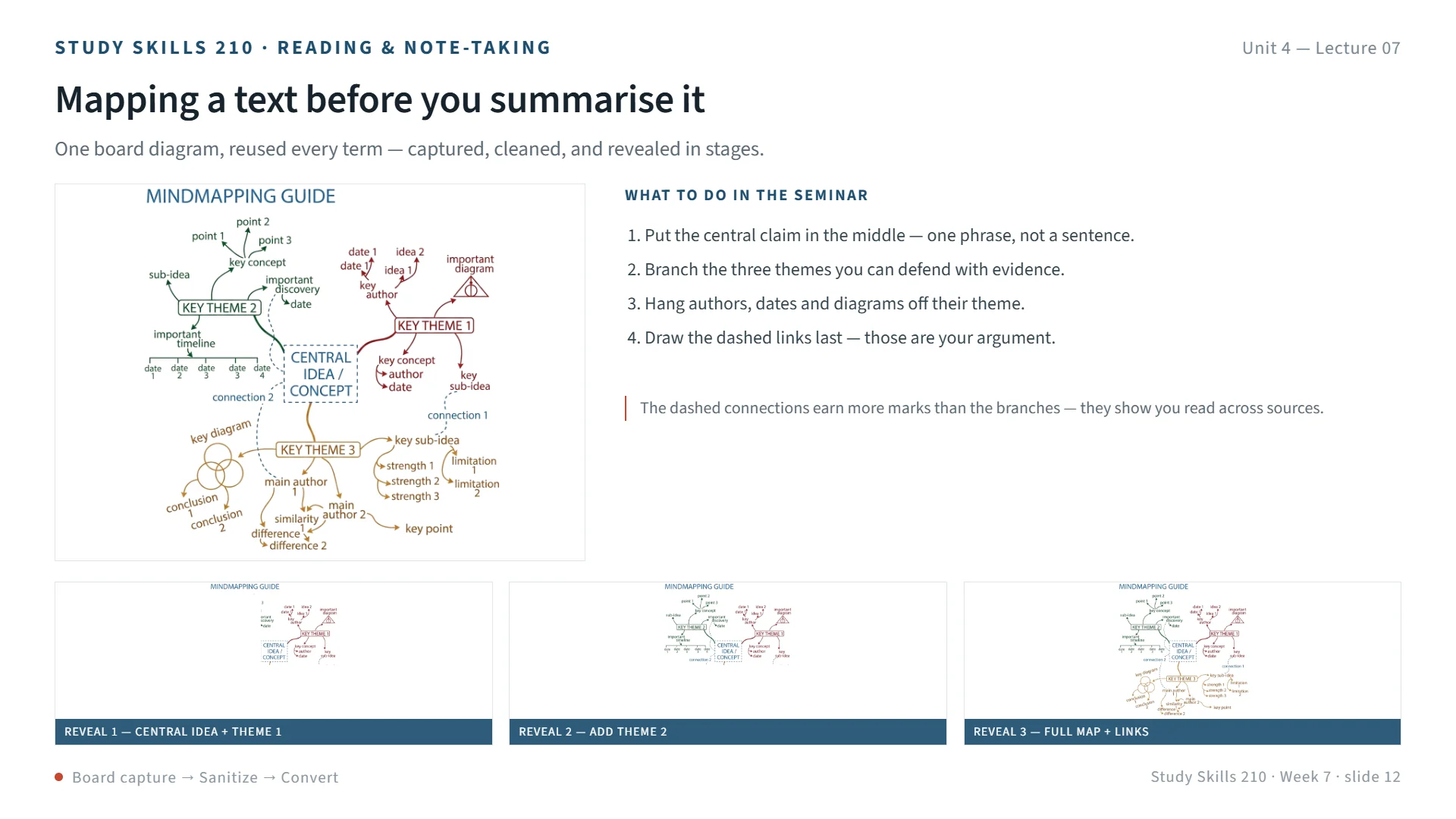
Mock lecture slide: a sanitized mindmap diagram placed in a course template, with a strip of three progressive-reveal thumbnails beneath it
One capture, one slide, three reveals — built from a sanitized board diagram.
VII.Growing demand

Sticky-note walls that survive the wipe-down.

Retros, affinity maps, journey walls and brainstorm clusters are among the most valuable and most fragile artefacts a team makes. They live on a physical wall for a day, get photographed, and then someone volunteers to retype ninety notes into a digital board. Usually two-thirds of them make it.

SketchAlchemy reads the wall as it is: notes come back as cards that keep their own colour and position, handwriting typed out, cluster structure intact*. Because colour is carried over rather than normalised, the encoding your team invented in the room — yellow for problems, pink for blockers — still means what it meant. You get a digital board you can sort, re-cluster and turn into tickets, without the retyping tax that kills the follow-through.

Sanitize + ConvertScrum mastersFacilitatorsProduct teamsRetros & affinity maps
Workflow
1One straight-on photo of the wall — columns and clusters in frame.
2Sanitize + Convert: notes become coloured cards with typed text, still in place.
3Re-cluster, merge duplicates, add owners in the editable scene.
4Export to the vault or the retro doc; raise tickets from the survivors.
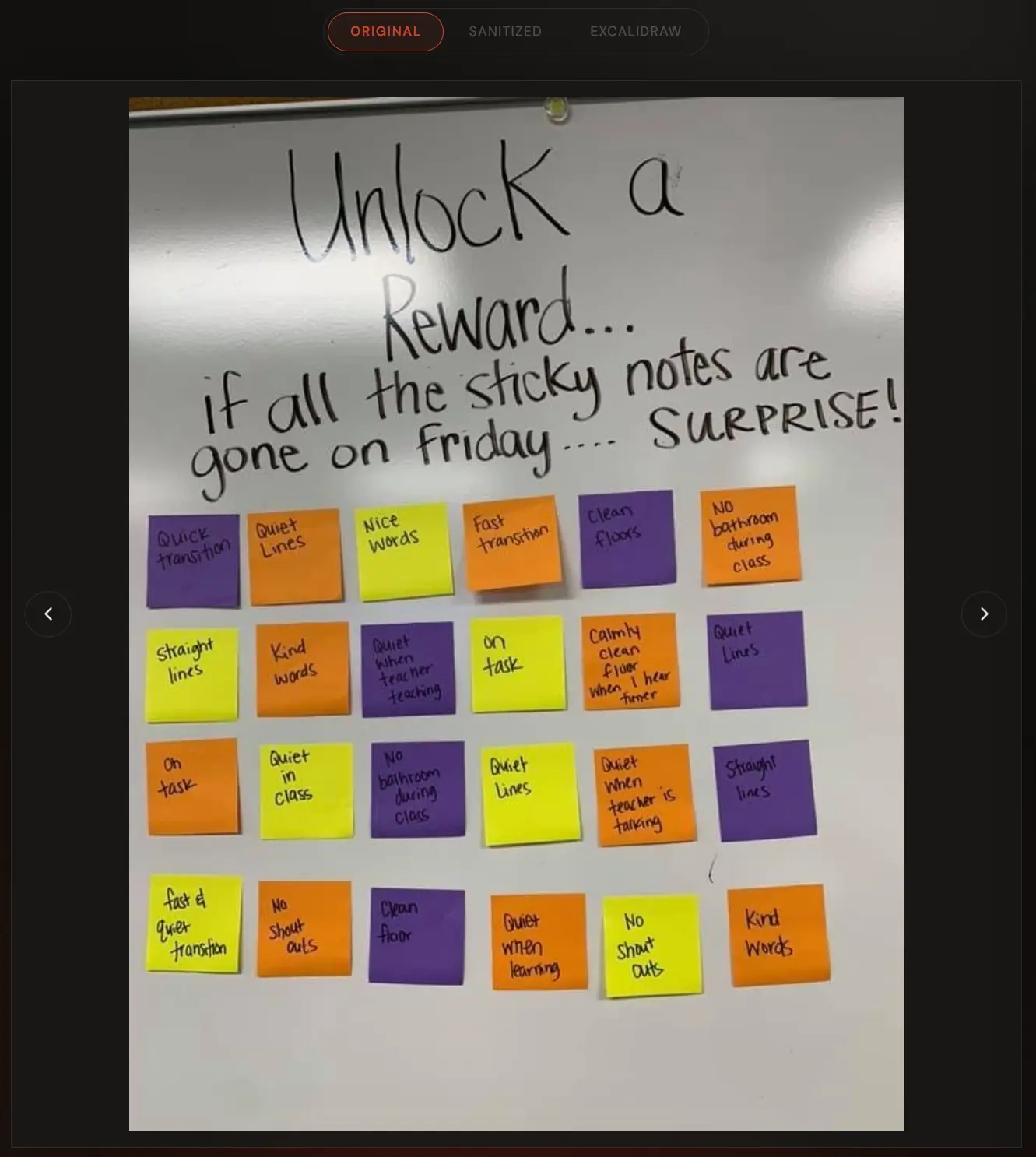
Wall photoEnlarge ↗
Photo of a classroom whiteboard with twenty-four handwritten sticky notes in purple, orange and yellow, shot at an angle with glare
Converted boardEnlarge ↗
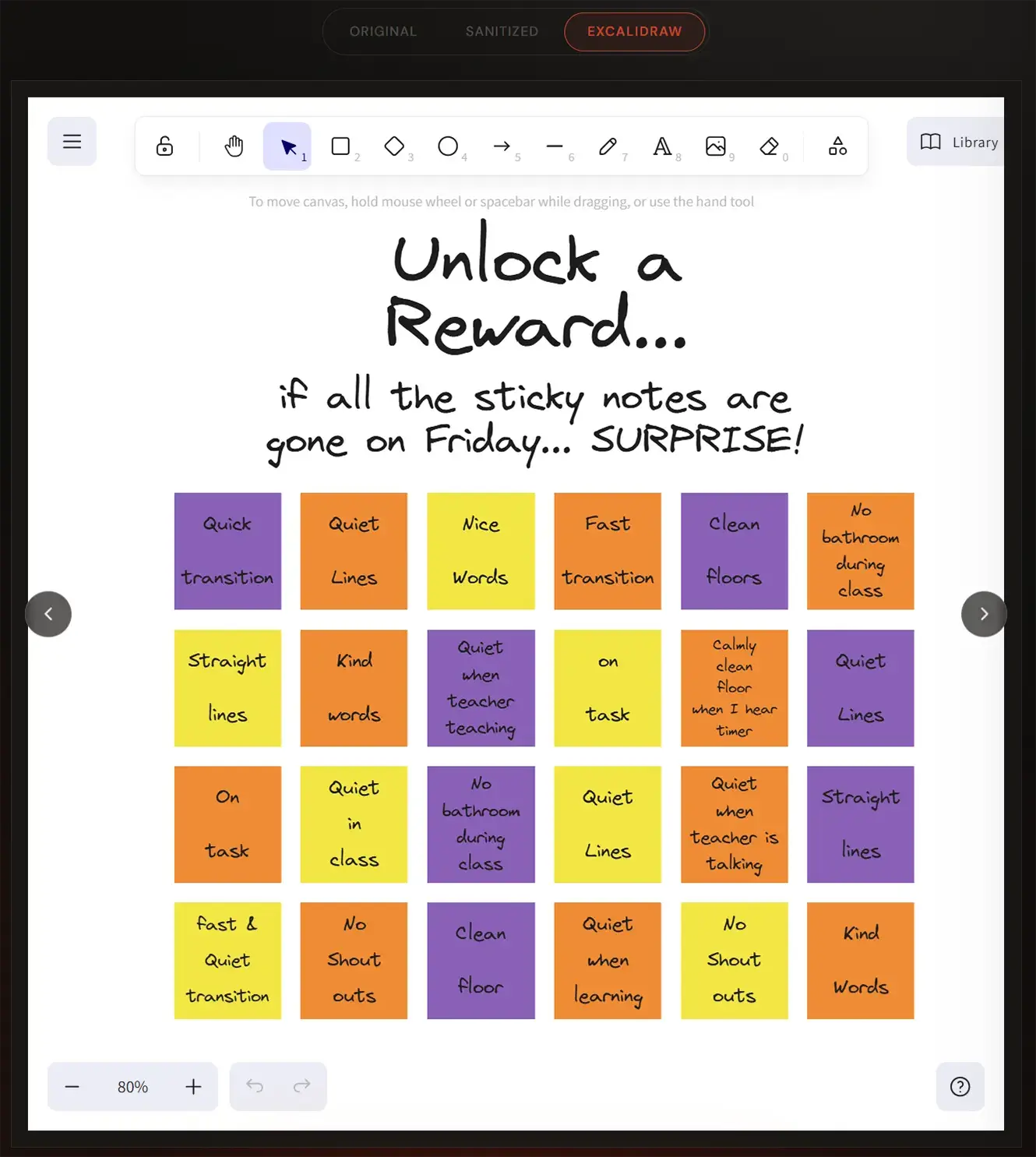
The same wall converted into an editable Excalidraw board: every note a coloured card on a straight grid with its handwriting typed out
Twenty-four notes, colours and grid intact, handwriting typed out — every card editable.
VIII.Niche · high value

Notebooks, field sketches and the archive nobody can read.

Lab notebooks, site surveys, maintenance sketches, the folder of drawings the engineer who left made in 2014 — organisations carry shelves of handwritten knowledge that is legally kept and practically unusable. Nothing in it is searchable, and nobody will retype it.

Digitising a backlog page by page turns it into clean, readable images plus editable scenes with typed, searchable text. Layout and annotation position are carried over, which matters when the sketch is the record — and since the scene is fully editable, anything the model reads wrongly is a drag-and-retype away from correct*. Teams typically start with the pages people keep asking for, then work backwards through the shelf — each pass making a little more institutional memory findable.

Sanitize + ConvertResearchersField & maintenance engineersOps documentationArchivists
Workflow
1Scan or photograph the pages — a phone scanner app is enough.
2Run Sanitize + Convert per page; check each preview before you keep it.
3File the .excalidraw.md next to its metadata in the vault or DMS.
4Search the archive by its contents for the first time.
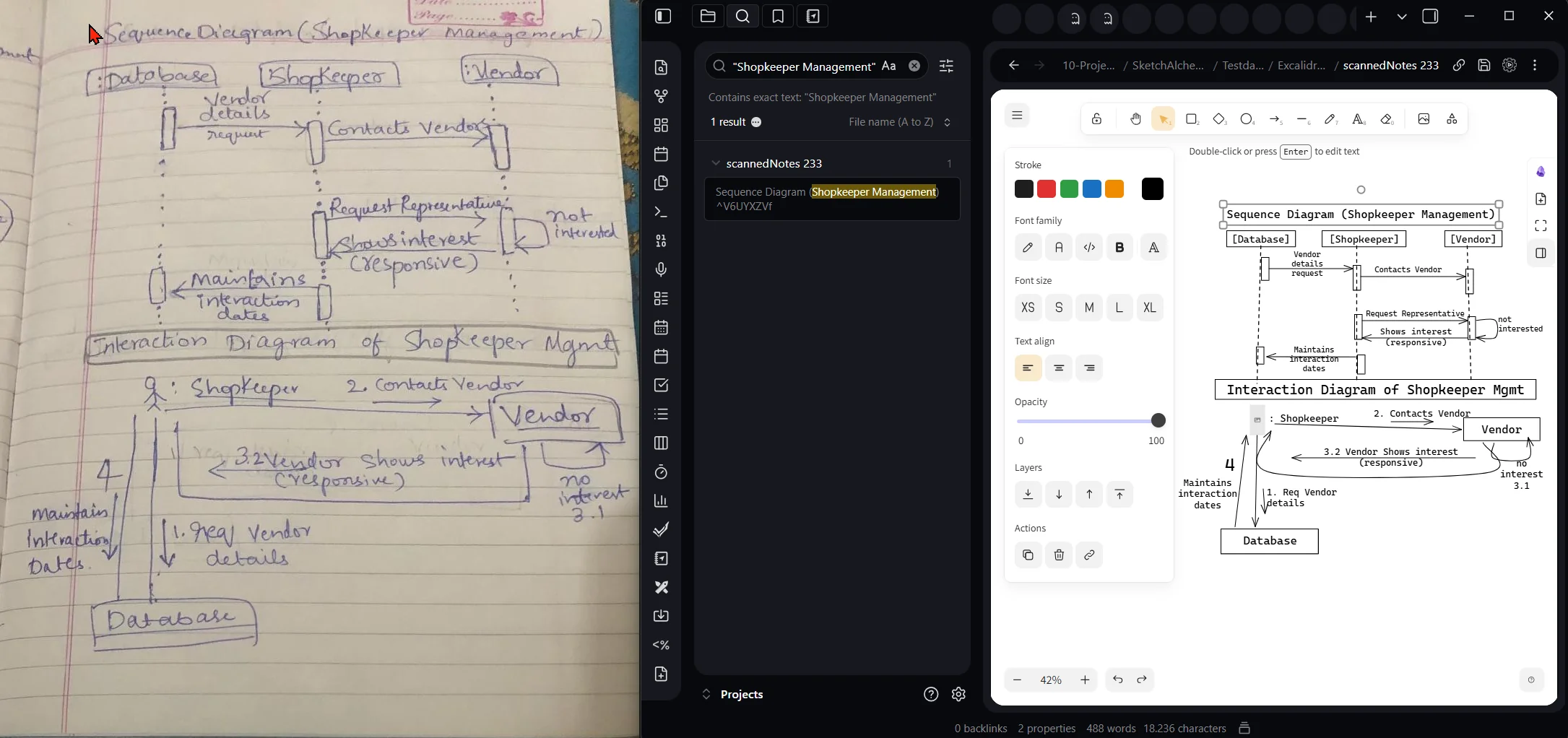
Handwritten lab notebook page beside a vault search for the term 'Shopkeeper Management', returning the converted page as a typed, editable diagram
The term from the handwriting, found by search, opening the converted diagram.
Accuracy note
What to expect from an AI conversion.

SketchAlchemy reads your sketch with AI models, and AI models make mistakes. On a busy, faint or unusually dense capture it can misread a word, merge two shapes, drop a small mark or add a connection that wasn't there. We tune hard for faithfulness — layout, sizing and colour are what we optimise for, not a tidy generic redraw — but no conversion should be treated as a guaranteed transcription of your original.

Which is exactly why the output is a scene and not a picture.

Everything that comes back is editable. Every box, label, arrow and card is a real Excalidraw object: retype a misread word, delete an arrow you never drew, nudge a shape back into place. Fixing a handful of details takes seconds — far less than redrawing the whole diagram, which is the alternative.

Practical habits that help: capture straight-on with even light, preview before you download and regenerate if a result isn't right, and keep the original photo alongside the scene whenever the sketch is a record you may need to check against.

Choosing

Which workflow does your use case need?

One upload, three possible outputs. If you're unsure, Sanitize + Convert is the one people keep coming back to — it gives you something to show and something to edit.

WorkflowUse it whenOutput
SanitizeYou need it legible and shareable now — study notes, deck images, a photo going into a doc.2K PNG
ConvertThe capture is already clean and you want objects you can move — paper wireframes, tablet sketches..excalidraw · .md
Sanitize + ConvertA real-world photo that has to become a maintained diagram — whiteboards, sticky walls, archives.clean PNG + scene
Questions

Common questions about converting sketches.

How do I convert a whiteboard photo into an editable Excalidraw diagram?

Upload the photo, choose Sanitize + Convert, and you get back a clean image plus an editable Excalidraw scene with real shapes, real text and real arrows. Download it as .excalidraw for Excalidraw.com or .excalidraw.md for Obsidian.

Can I turn handwritten notes into an Obsidian diagram?

Yes. The Obsidian-ready .excalidraw.md export drops straight into a vault as an editable, linkable note, with handwriting converted to typed text in the same position, colour and style.

Which sources and devices does it work with?

Whiteboard photos, iPad and Apple Pencil drawings, reMarkable exports, paper scans and sticky-note walls — anything you can capture as an image.

How accurate is the conversion?

It aims to rebuild your diagram in place — layout, sizing and colour carried over rather than normalised into generic shapes. It's AI, so on complex or faint captures it can misread text or add and omit a detail; because the output is fully editable, those are quick fixes. Read the accuracy note →

What does a conversion cost?

Every new account starts with $3.00 in free credit — enough for two to three full sanitize-and-convert runs. A single pass runs about $0.25 in credits, a full sanitize-plus-convert about $1.00, and you always see the estimate before a job runs. See pricing →

Can I see real conversions before signing up?

Yes — the home page opens a real converted diagram in a live Excalidraw canvas you can edit without an account, and the sample library below it steps through dozens more genuine conversions. Try the example →

Find your use case?
Transmute your first sketches free.

$3.00 of free credit on every new account — enough for two to three full conversions, no credit card, whichever workflow you need.